Posted by Mai Tho
Tuesday, January 21, 2014
Blurred Music will take the background when listening to music and gives it a “blur” effect. It is a cydia app that is more eye pleasing than functional but we love it all the same.
Many people love it because it catches their eye during its working. But it is a cydia app via reddit. So Blurred Music App is not free!
Posted by Mai Tho
Wednesday, January 15, 2014
Hi, Ladies and Gentlemen! I think all of you and everyone who upgraded their devices into the latest iOS version, IOS 7, are feeling so excited with tweaks of IOS7 jailbreak. And now, are you looking for more great Cydia Apps? Visit my blog and received latest news to do it easily. I strive to bring you the most updated list of apps when you decide to download Cydia for iOS 7 Jailbreak.
And now, you can install any Cydia apps and tweaks for your iPhone, iPad, iPod Touch when Saurik releases them. Cydia Tutorials Blog will give you the links to download, and help you to know necessary tutorials. Certainly the Blog is keeping a list of cydia apps ready for iOS 7 jailbreak, I think so. (correct me if i'm wrong)
In fact, the Cydia download apps for iOS 7 is under construction. Almost releases are only little notices to Cydia App developers. But the critical Cydia Apps for iOS 7 jailbreak are always ready to be downloaded. I advise you to watch the Jailbreak subreddit to keep up with new releases.
Overall Cydia Tutorials Blog is here to try and make the Cydia iOS 7 app selection easier for every iOS 7 users. But if I have not featured or reviewed an Cydia app, I am always glad to hear any feedback, comments, questions. You can reach me by email: hatuankiet1986@gmail.com.
Posted by Mai Tho
Monday, January 13, 2014
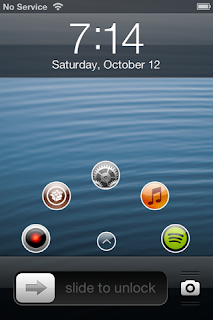 |
| Simple Mode, Lock Screen Laucher on iPhone |
Simple Mode keeps 5 apps on your lockscreen, they are your top 5 most used apps. You can access your favorite apps easily by tapping on the small arrow button to unlock the screen and tapping on the icon to launch the app.
The animation of these apps are very beautiful, you touch an icon to open app simply. If you want to animate the icons away, touch the little arrow icon. And when you want to show them if they are hidden, take action against.
With Simple Mode Lock Screen App Launcher, you also can set an app to auto-open when you unlock the device. So you alway have this app when your device is unlocked or nothing when you lock it.
Simple Mode is a customizable tweak. you can control the speed of the animation, change the User Interface settings, disable apps from being allowed in your top 5, change the size/position/animation time/alpha of the apps and more.
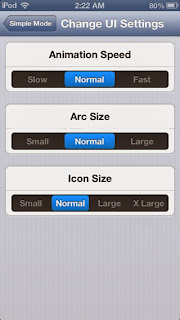 |
| Simple Mode, An Easy Custom Lock Screen Laucher |
Simple Mode is not the most beautiful lockscreen launchers, but it is the simplest. it offers alot of unique features. It is available on Cydia to download with a price $1.99. It supports almost Apple devices and requires iOS 6 or higher.
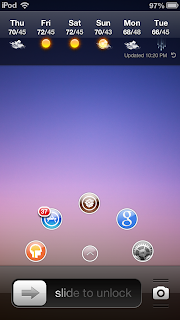 |
| Simple Mode, Lock Screen Laucher on iPod Touch |
Do you think this is an useful tweak?
Posted by Mai Tho
I think it is a great new for all of BiteSMS fans who are using one late-model iPhone. BiteSMS 8.0 Beta 7 is out with support for iPhone 5S. This update is suitable for now. In addition, it includes bug fixes and user interface improvements. Especially, this version fully supports for iPhone 5S.
However, BiteSMS 8.0 Beta 7 does not really work well with all devices because of some complications with the 64-bit A7 processor. So it is still limited to older devices.The IPhone 5S users can really enjoy the BiteSMS app on iOS 7.
I think I do not need introduce about BiteSMS any more. Because all of you know it as an alternative to Apple’s stock messaging app, with features like quick reply, quick compose, scheduled messages, and more.
BiteSMS 8.0 is available for download at the default BigBoss repo in Cydia. But I think you also get the latest beta version at Cydia source: http://test-cydia.bitesms.com. I hope this Cydia App will be helpful for all of BiteSMS fans. Have fun!
Posted by Mai Tho
Sunday, January 12, 2014
Do you like your device to look minimal and clean? That mean when you are looking at the lockscreen, the only thing you see is your clock. I think you are like me. Flex 2 is a Cydia App can do that by a few simple changes away. Flex 2 is now available for download at almost popular repos. Certainly, it is free. And now you can customize your lockscreen by simple tutorials below.
- First using the Flex 2 Cydia app, navigate to Springboard and process the spring board library.
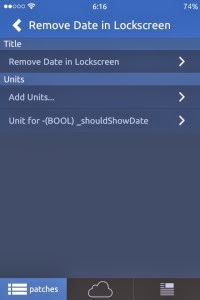
- Then search for ‘_shouldShowdate’ it should be a (BOOL) object. See the screenshot below.
Flex 2 Cydia App
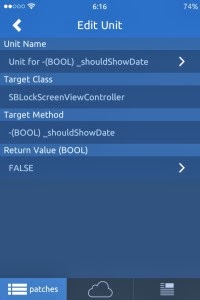
- After that, simply go to the patch you just created and enter FALSE as the return value. See below.
Flex 2 Cydia App
And you have completed this process! Go ahead and turn it on and respring and you are well on your way to having that minimal lock screen you have been looking for. There is only a clock on a clean screen. Have fun!
Posted by Mai Tho
Saturday, January 11, 2014
iCleaner Pro is now updated to the version 7.0.1 for download. I think some of you used to use this app to cleanup your iOS devices. It is a wonderful optimization application. iCleaner Pro removes unnecessary files from your device, and allows you to tweak it to your liking. Some important features are listed below.
 |
| iCleaner Pro 7.0.1 |
- With Safari Browser: it deletes cookies, browsing history and cache files to free up memory and preserve your privacy.
- With Cache files: it scans and deletes system cache files and databases. Some of them are rebuilt upon respring. This helps removing obsolete cache data.
- Temporary files: it deletes temporary files from your device. These files are meant to be removed automatically, but they often happen not to. iCleaner takes care of that.
- Applications: it deletes unnecessary AppStore apps caches, cookies, temporary files and snapshots. Furthermore, it detects popular applications for a more in-depth cleanup.
- Log files: it deletes log files and crash reports from known locations. These files are generally irrelevant to the user and can be safely deleted.
 |
| iCleaner Pro 7.0.1 features |
- And many other useful features...
I think this is an indispensable application for all iOS users. The current version is available for free download on almost Cydia repos. Download iCleaner Pro 7.0.1 and enjoy its features now!
Posted by Mai Tho
Firmware iOS Version 7.0.4 is now available for download. You can upgrade this version by downloading one of links below, which is suitable for your device.
Download Firmware iOS 7.0.4
- 7.0.4 (4 GSM): iPhone3,1_7.0.4_11B554a_Restore.ipsw
- 7.0.4 (4 8GB): iPhone3,2_7.0.4_11B554a_Restore.ipsw
- 7.0.4 (4 CDMA): iPhone3,3_7.0.4_11B554a_Restore.ipsw
- 7.0.4 (4S): iPhone4,1_7.0.4_11B554a_Restore.ipsw
- 7.0.4 (5 GSM): iPhone5,1_7.0.4_11B554a_Restore.ipsw
- 7.0.4 (5 GSM+CDMA): iPhone5,2_7.0.4_11B554a_Restore.ipsw
- 7.0.4 (5c GSM): iPhone5,3_7.0.4_11B554a_Restore.ipsw
- 7.0.4 (5c GSM+CDMA): iPhone5,4_7.0.4_11B554a_Restore.ipsw
- 7.0.4 (5s GSM): iPhone6,1_7.0.4_11B554a_Restore.ipsw
- 7.0.4 (5s GSM+CDMA): iPhone6,2_7.0.4_11B554a_Restore.ipsw
If you use Safari Browser to download, the first you have to disable the automatic extract. We recommends you use FireFox Browser to download filmware easily for iPhone, iPad, iPod Touch or any Apple devices.
Posted by Mai Tho
Friday, January 10, 2014
KeyBlack App is one of the best Cydia Apps for iOS 7. This first of many Cydia Apps makes your iOS keyboard a darker color throughout your device. I think it is a wonderful app to have if you want to use a dark theme. You can see the screenshot below to understand what I mean.
Posted by Mai Tho
Are you expected to have full control when you jailbreak your iOS devices? iFile is one Cydia App can help you to do it easily. By using iFile, you can change labels in settings to say whatever you want. iFile App is now available at almost Cydia Repos.
You will understand what I mean when take a look at the photo below. Here are some step by step tips to change labels in settings by using iFile App.
var/stash/Applications/Preferences.app/Settings.plist
- Be sure to back the original file up before you start messing with it. I just named it Settings-old.plist, copied it, then renamed the copy back to Settings.plist.
- Using the property list editor, you want to look for ‘label’ strings amongst the many dictionaries in the ‘items’ array. You can also delete entire dictionaries and their corresponding labels will be removed from Settings.
- Oh, and to change the title at the top of the Settings app, just edit the ‘title’ string at the root of the plist.
Is it really useful for you? Download iFile Cydia App now and customize your devices easily with this wonderful Cydia App. Have fun! Tags: iFile, iFile App, Download iFile, Change Labels, iFile Cydia.
Posted by Mai Tho
Tuesday, January 7, 2014
This means that you can colorize things like Notification Center, Control Center, banner notifications, Volume HUD, the dock, and more.
Fancy Tweak is one of those tweaks that may not seem very cool when hearing it described, but changes your mind completely after seeing it in action. You will feel wonderfully with these tweaks. Fancy will be available on Cydia’s BigBoss repo after its release. I wish you to have wonderful experiences with Fancy Tweak.
Posted by Mai Tho
Bigify+ 3.0 is one of most important apps in the iOS 7 jailbreak. It has been released in recent days. This app is ready for the general public. However, you should remember that this is not a free version, you have to use this version with a price: 2 $ every penny.
Downloading Bigify+ 3.0 is very useful. With Bigify+ 3.0, you can change the looks of your icons, alter the size, rotate, hide labels, flip badges and change the transparency of your iOS app icons or cydia app icons. Specially, For the iOS 7 ready version, they added a preview window, a colorizer and some additional textures. You can preview the screenshot below.
You can get this wonderfull apps and more at the BigBoss. Have fun!
Posted by Mai Tho
Sunday, January 5, 2014
iOS 7 Theme for iPhone: contains an iOS icon set and is free from ModMyi repo
iOS 7 Bars And Battery: a status bar identical to iOS 7 with the new icons for battery and signal strength. Also available free on ModMyi repo.
BlurriedNCBackground: provides a Gaussian blurred background in place of the stock linen one in iOS 6. Free from the BigBoss repo.
CardSwitcher: A replica of the new App Switcher and virtually the same as multitasking in iOS 7. Costs $1.99 from BigBoss.
Thin Lockscreen: A minimal lock screen, similar to the iOS 7 one. Available free on the patrickmuff.ch/repo.
FolderEnhancer: Simulates the look and function of folders. Costs $2.49 from BigBoss.
Auxo: An old favorite, similar to the new Control Center with more functionality. Costs $1.99 from BigBoss.
DeepEnd: Simulates the tilting icons effect on iOS 7 by moving the wallpaper. Available for free on rpetri.ch/repo.
BytaFont + Roboto Light: Similar to the iOS 7 default font. Both free on Cydia.